The Parent Signature Verification task needs to be completed if your parent is submitting electronic forms to ASU. It serves as an electronic signature.
1. Your parent will log into their own My ASU account and then click the Guest button under their name near the top right.
2. That will bring you to the following screen. Select whichever option best suits your needs. Note that only the first option allows you to confirm your parents' electronic signature. The second and third options will prompt you to complete the PDF versions of the forms instead.
3. Your parent will fill in the blank boxes with their Social Security number, date of birth, first initial, and last name. All information must match the parent's My ASU account and the information on their FAFSA.
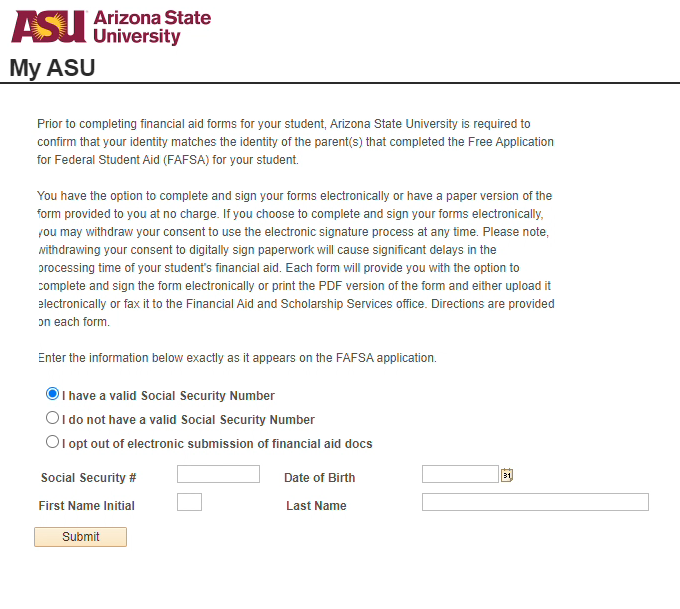
4. Click submit.
- If the information matches what is on your FAFSA, it will go through. The Parent Signature Verification task will update to Received within 2 business days.
- If the information does not match what is on your FAFSA, an error will appear. Check your FAFSA to ensure that all information is correct.
Please note: If your parent selects one of the two bottom options, then electronic form submissions from your parent will not be reviewable. They will need to select the option to fill out a PDF when filling out other financial aid forms.
Need additional help? Access 24/7 live chat, create a case from My ASU Service Center or call 855-278-5080.
