What are your @asu.edu email addresses or routings?
A routing can be viewed as an additional email address that delivers to your ASU mailbox. Using real mail as a comparison, mail directed to S. SunDevil will deliver to the same home address as Sparky Sundevil. By default, everyone receives their ASURITE@asu.edu as a routing. This address is required and cannot be changed or removed.
You can add, remove, or change your other @asu.edu routings. You can set them once and forget them, or you can change them as often as you want. But remember, changing your official asu.edu email routing is like changing your phone number or street address; you have to notify all the people you gave the old address to.
It is important to note that removing or changing an existing email routing will render all new messages to the old address undeliverable. If you've had an email address for a while, it may not be a good idea to delete it outright since others may still have it saved and use it to email you. You can instead add new @asu.edu email routings and keep your old ones.
Where to manage your email address routings:
You can manage your email routings by first reviewing Where does your @asu.edu email addresses send to?
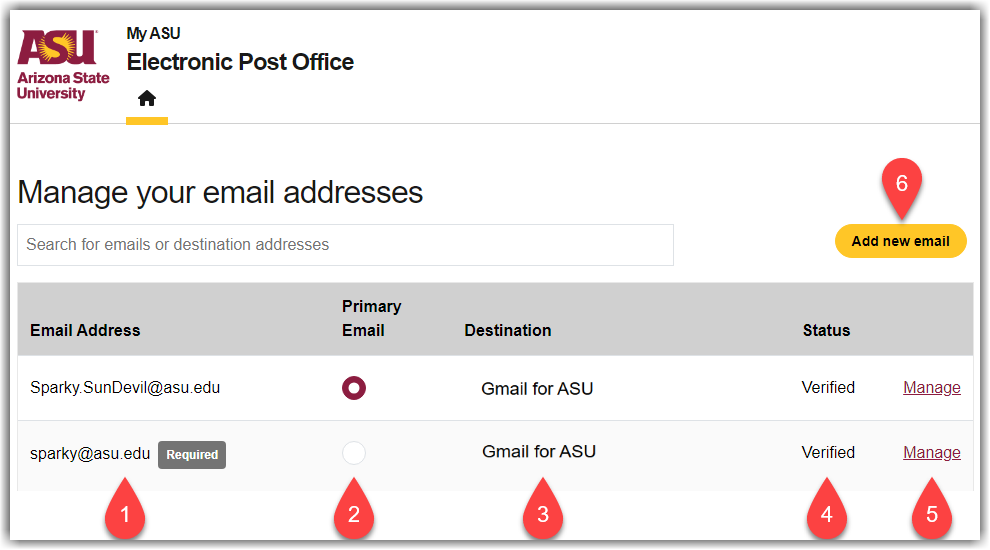
After navigating to ASU's Electronic Post Office page, you will see the below page, which contains the various email addresses (called routings) that you can manage. Here is a breakdown of each item found on this page:
-
The list of all Email Addresses you currently own (your asurite@asu.edu address is required).
-
The Primary Email Radio button allows you to set one Primary Email address. This address will update a few backend systems but will have no impact on logging in anywhere.
-
The Destination for the corresponding email address.
-
The Status indicates whether you have responded to the verification email when updating or adding a new address.
-
The Manage button will navigate to the page for changing the destination of an address or deleting a routing entry.
-
The Add new email button will navigate to the page where you can add new routings, if you are eligible.
⚠️
Eligibility Notice
Individuals who are eligible for an ASU Gmail account will no longer see the option to add a non-ASU destination for their EPO routings.
If you wish to receive emails in a separate mailbox, please see about configuring a forwarding rule on your individual mailbox.
Create a new routing:
To check or adjust your routing settings, please either navigate to ASU's Electronic Post Office (EPO) page, or complete the following steps:
-
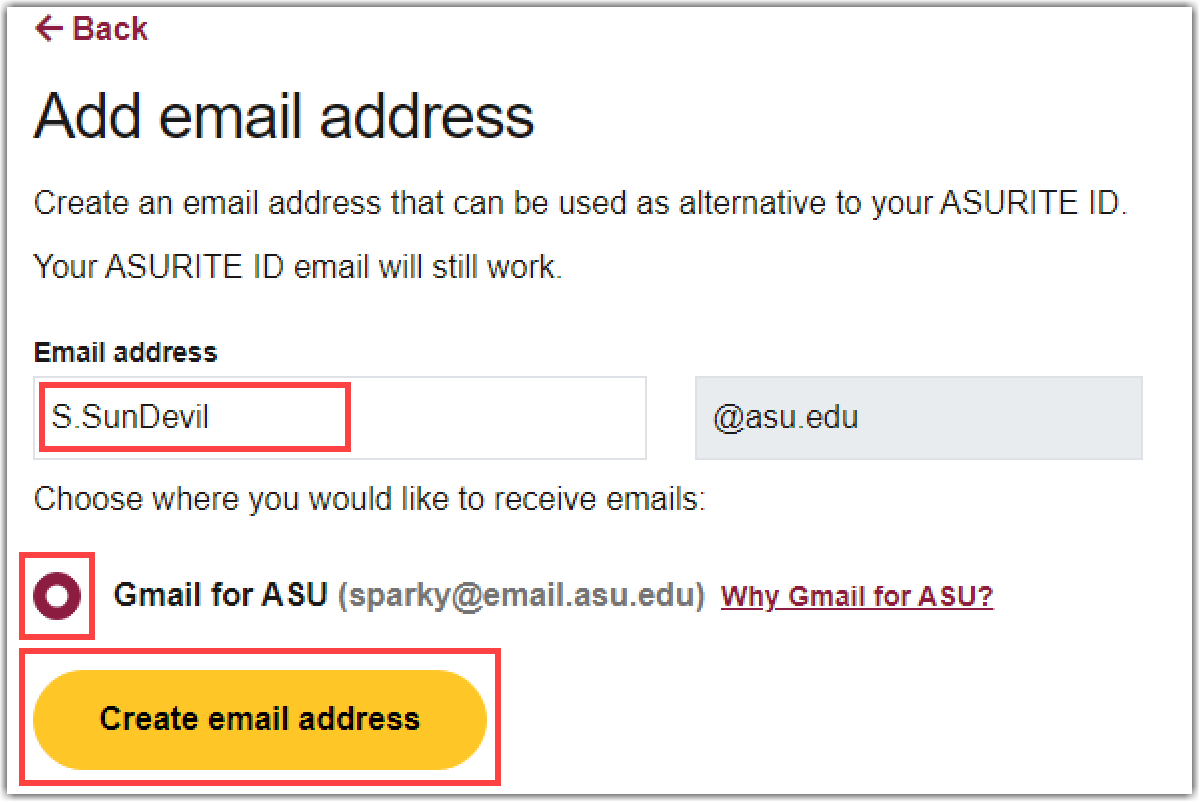
At the Manage your email addresses page, select Add new email. (See #6 Above)
-
In the Email Address field, enter the address of the routing you'd like to create.
-
Select Create email address to save this new routing.
Updating the destination of a routing:
-
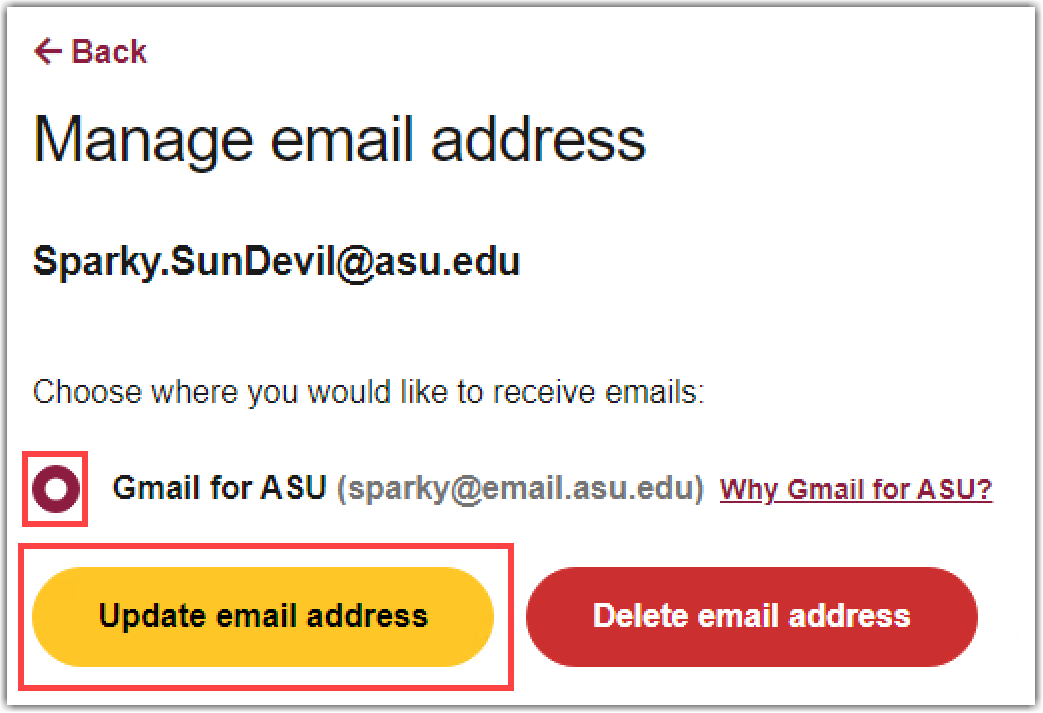
To update the destination for an address, select Manage next to the corresponding email address. (See #5 Above)
-
Select Update email address after making a change.
-
After configuring your email to your liking, you should test it to make sure you receive the message in the location you’re expecting. Below are some guidelines to follow when testing:
-
Wait a few minutes after changing your settings before testing.
-
Have someone else send you a test message instead of sending it from yourself to yourself – some email services and programs are configured to filter out messages sent to yourself.
-
Make sure the message includes a FULL subject line and content in the body to avoid it accidentally being caught by a SPAM filter.
Delete one of your routings:
-
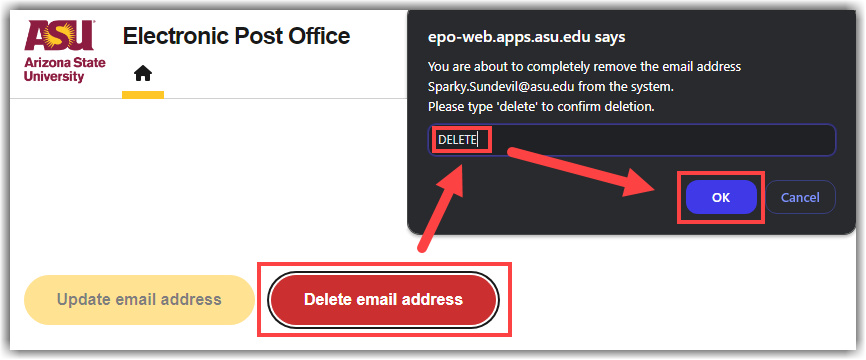
To delete a routing, select Manage next to the corresponding email address. (See #5 Above)
-
Select Delete email address to open a confirmation dialogue box.
-
Before you can delete the routing, you must type in DELETE, and select OK.
NOTE: Deleting a routing will remove that address on your account. Emails sent to that address will result in an undeliverable bounceback.
Need additional help? Access 24/7 live chat, create a case from your My ASU Service Center or call (855) 278-5080.
