Setting Pronouns in Canvas
Personal Pronouns in Canvas
Effective March 9, 2020, ASU has adopted a new Canvas feature that gives users the option to display their personal pronouns next to their names. We encourage all ASU staff, faculty, and students to set their personal pronouns in Canvas when it becomes available.
Why are Pronouns Important?
Correctly using someone’s personal pronoun when communicating with them shows respect for their identities and helps foster an inclusive community that allows all students to succeed. This aligns with the ASU charter, which states the university “is measured by whom it includes and how they succeed.”
How do I Set Pronouns in Canvas?
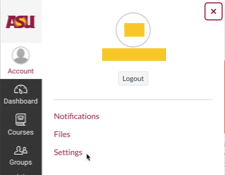
Click on Account in the global navigation menu and select Settings from the drop-down menu.
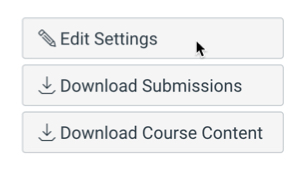
Click the Edit Settings button on the right side of the page.
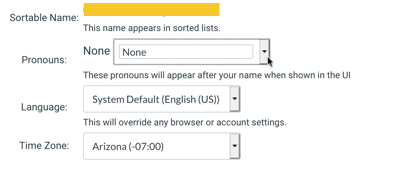
In the Pronouns drop-down menu, select your preferred pronoun from the drop-down list, then click the blue Update Settings button.
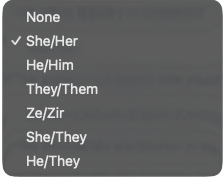
Current choices for pronouns include:
Resources
For more information, see the resources below:
- ASU Committee for Campus Inclusion
- ASU Safe Zone Training
- ASU Faculty Support Guide
