How do I submit work with TurnItIn for Students?
Information about TurnItIn plagiarism checker in Canvas, including: supported file types, file size limitations, and best practices.
What is TurnItIn?
TurnItIn is a tool in Canvas that checks files for plagiarized content. Each file is compared to work you’ve previously submitted, work other ASU students have submitted, and work that students around the world have submitted. It also compares your work to other resources on the internet, including paid paper databases and public websites.
What supported file types can I submit via TurnItIn?
Your instructor will tell you which file types they prefer. TurnItIn will accept any of the following files:
- HTML
- Microsoft Word® (.doc/.docx)
- Microsoft PowerPoint® (.pptx, .ppt, .ppsx, and .pps)
- Microsoft Excel® (.xls and .xlsx)
- Hangul Word Processor file (.hwp)
- OpenOffice Text (.odt)
- Rich text format (.rtf)
- WordPerfect® (.wpd)
- Plain text (.txt)
- PostScript (.ps)
- Google Docs via Google Drive™
- Adobe® PDF
You can find additional resources on the Turnitin website regarding file requirements.
What is the minimum/maximum file size for TurnItIn submissions?
- Files must be less than 40MB.
- Files must contain more than 20 words.
- Files must be less than 400 pages.
How do I submit a file to TurnItIn?
- On the File Upload, Google Doc, or Google Drive tabs, you can select a file to submit by clicking the Choose File button.
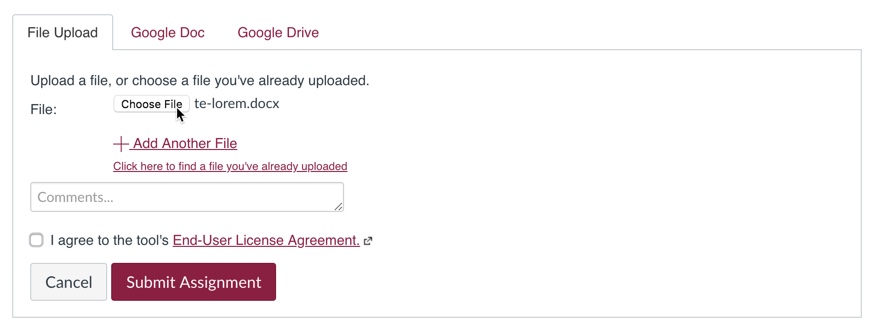
- Once you’ve attached your file, review the End-User License Agreement for TurnItIn and check the box to agree to it.
- Click the Submit Assignment button
What do I do now that I’ve submitted?
We always recommend reviewing your plagiarism report for inconsistencies! Generally, it should take about 15 minutes for TurnItIn to process your plagiarism report. Instructions for accessing and reading your report are available here.
Academic Integrity at ASU
For more information about academic integrity at ASU, please visit https://provost.asu.edu/academic-integrity . Contact the Experience Center 24/7 live chat, create a case from your My ASU Service Center, or call 855-278-5080.
